July 1st 2025
Expanding Orca Scan into the Design Ecosystem
A product-led growth initiative: from idea to 500+ installs in the Figma Community
The Opportunity
Orca Scan helps enterprise teams across manufacturing, healthcare, and logistics manage barcode data at scale. Our users are primarily operations teams — but we started noticing a different kind of user showing up: designers and creative professionals building packaging, signage, and event materials in Figma who needed barcodes as part of their workflow.
They weren't our core user. But they were touching our ecosystem.
In a conversation with our founder, we identified a gap: Figma had no quality barcode generator plugin. The existing options were outdated, technically unreliable, or had terrible UX. We saw an untapped entry point — a tool that could solve a real problem for a new audience while expanding Orca Scan's reach into the design community.
I took ownership of it.
Why a Figma Plugin?
- Designers working in Figma for print, events, and packaging often need to create barcodes but lack good tools
- With Orca Scan, they could generate, manage, and track codes without technical support
- The plugin could surface new use cases in industries we already serve
- It also allowed us to explore plugin development as a new product strategy
- It was also a perfect sandbox for me to apply both design and code thinking to solve a real problem

My Role
This was a full-stack product initiative, not a design handoff. I owned it end to end:
- Competitive research across existing Figma plugins (20+ analyzed)
- Problem definition and feature scoping
- UX and UI design, using Orca Scan's design system and tokens
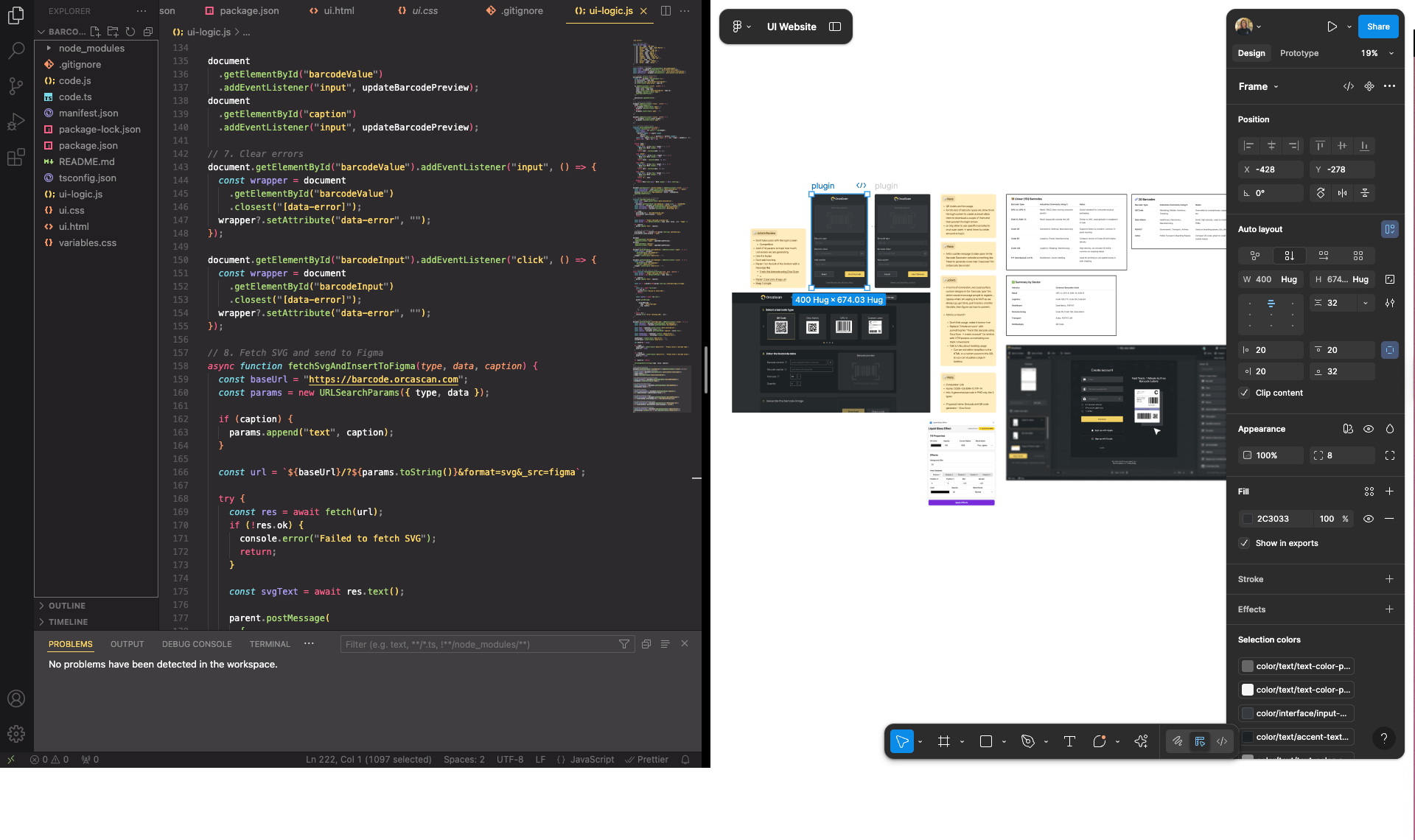
- Frontend implementation — vanilla JS, HTML, CSS, Figma Plugin API
- Integration with Orca Scan's barcode generation logic (QR, EAN, Code 128)
- Internal testing, iteration, and Community launch
“I didn’t write code to become a developer — I wrote code to become a better designer”
The Strategic Framing
Before touching Figma, I had to answer: is this worth building?
I mapped three angles:
User need — Designers regularly need barcodes for print, packaging, and events. The workaround (exporting from external tools, re-importing) was slow and error-prone. A native plugin would remove that friction entirely.
Business case — Every Figma user who installs the plugin is a potential Orca Scan lead. It's low-cost brand presence in a community we weren't reaching at all.
Feasibility — The Figma Plugin API is well-documented. With our existing barcode logic already built, the integration was tractable. The main unknown was my own JS fluency — which I treated as a constraint to work around, not a blocker.
Design Process
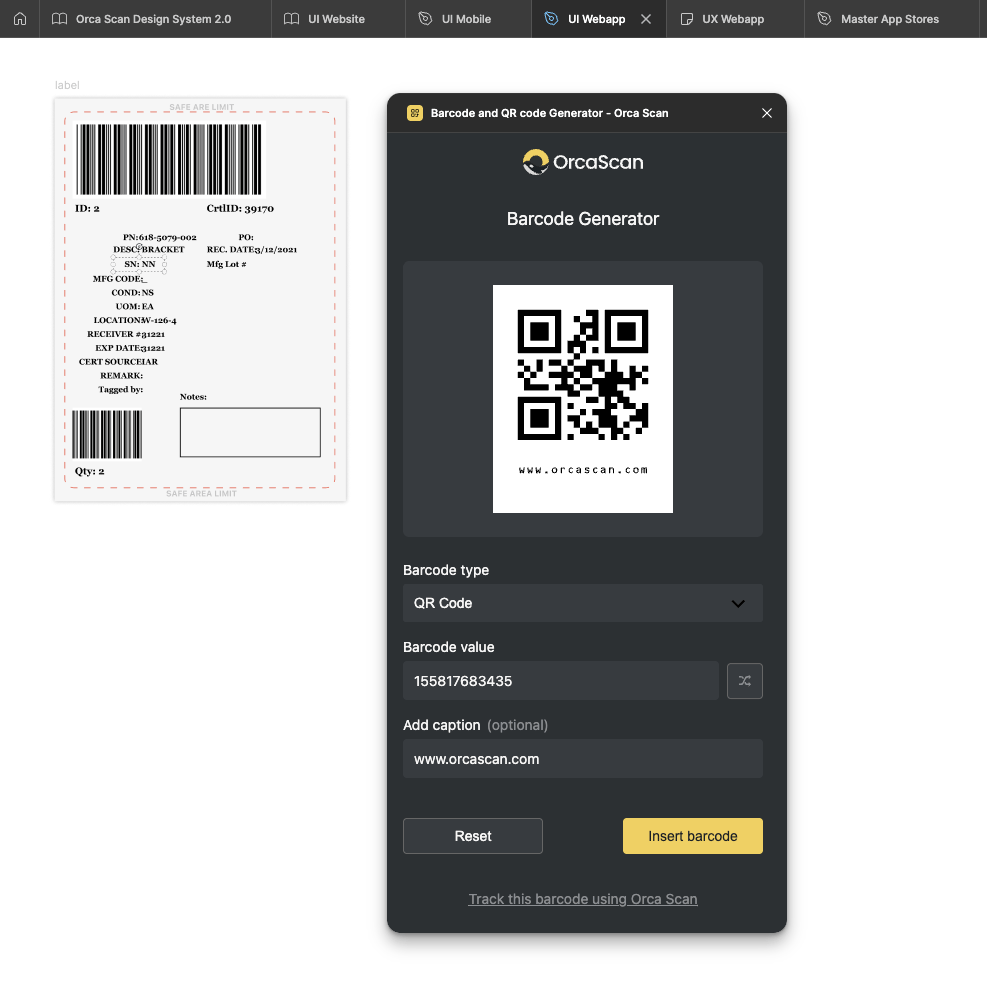
I designed the plugin UI directly in Figma before writing a single line of code — keeping it minimal, on-brand, and immediately familiar to our existing product language. I pulled tokens from our design system to maintain consistency even in this micro-tool.
The UX challenge was specific: Figma plugin panels are small, modal, and users have zero tolerance for complexity. Every element had to earn its place. I cut three features from the initial scope because they added friction without adding value.
Building It
I had never shipped a Figma plugin before. I approached it the same way I approach any design problem: research the constraints, break it into parts, start small.
The plugin architecture required four files working together: manifest.json, ui.html, code.js, and style.css. I learned the Plugin API by doing, not by waiting until I felt ready.
The hardest part wasn't the code — it was knowing what not to build. Scoping a focused v1 that was shippable and useful, rather than a bloated one that never launched.
Results
- 500+ installs in the Figma Community since launch
- Featured on Orca Scan's official channels and promoted via LinkedIn, driving measurable brand awareness in the design community
- Opened a new acquisition segment — creative professionals who hadn't previously interacted with the Orca Scan ecosystem
- Demonstrated that design-led product bets can create distribution without a dedicated marketing budget
What This Taught Me About Product Design
This project changed how I think about scope, ownership, and impact.
Designing the UI was the easy part. The harder — and more valuable — skill was making the product case: why this, why now, what does success look like. And then building it myself, because waiting for engineering resources would have meant it never happened.
The gap between "I had the idea" and "it's live with 500 users" is execution. That's what I learned to close.
Tools used in this project
Figma | HTML/CSS | JavaScript | Figma Plugin API | Orca Scan API | VS Code | GitHub
Do you want to try the plugin?
Go to Plugin website

